Every worked shift at a staffing firm becomes a timesheet. Each one has to be approved by the client, checked against that client’s pay rules, paid and invoiced. At a firm with 1,200 shifts a week, most of that work is still done by hand, and most of it lands in the two days before payroll.
This piece shows how that process becomes agentic: agents do the routine steps, and people keep the decisions. We follow one example firm, Example Care Staffing, from the process it runs today to an agentic version that runs every week and keeps improving.
In short: you describe the process in a conversation with Aito, the assistant in the Aitonomy app. Aitonomy draws the process, designs the agents for it automatically, and shows you what they do, use and cost.
About this example
Example Care Staffing is not a real firm. It is built from our research into 66 Dutch staffing firms. The process is the one these firms describe in their own job adverts and sector sources. The numbers are example figures, and the result shows how we calculate them.
3 days → same day
From worked shift to approved hours
9 in 10
Timesheets that no longer need a person
120 → 30 h
Office hours on timesheets each week
The problem: Thursday is payroll day
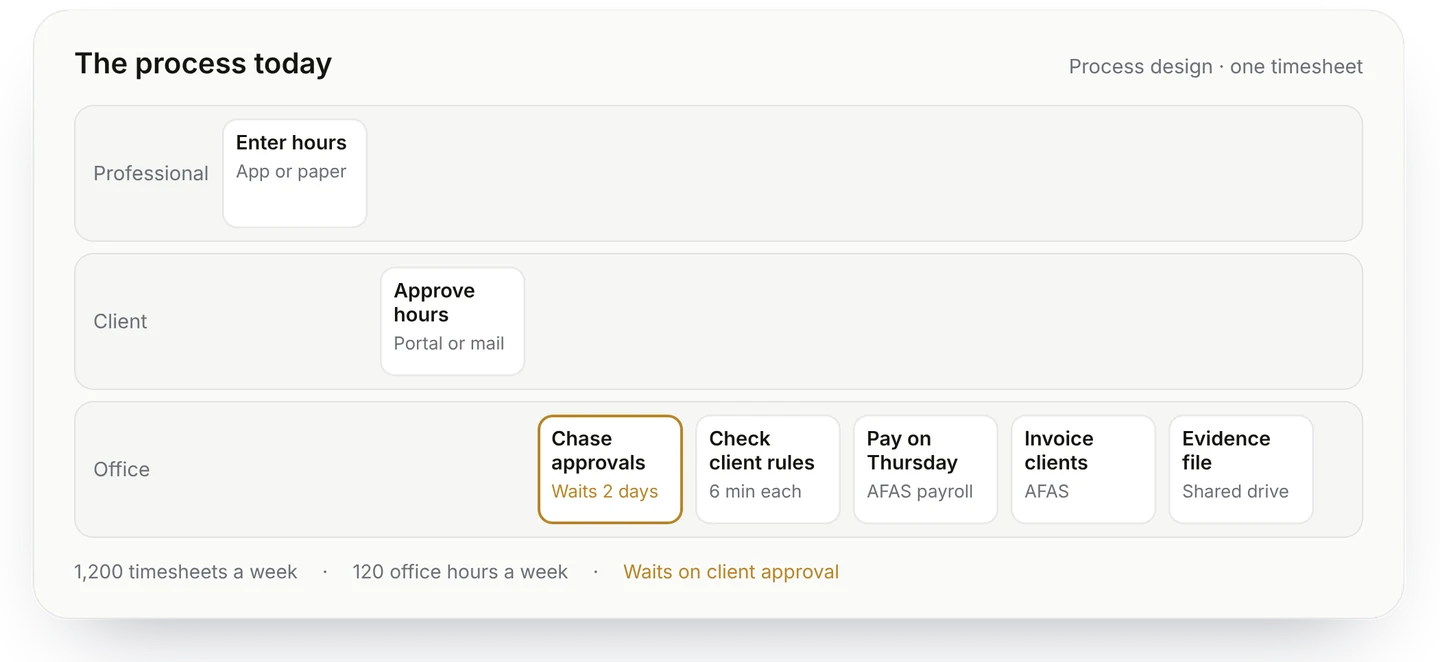
Example Care Staffing places 600 nurses and carers in 70 elderly and disability care institutions. Every shift produces a timesheet, so the office handles about 1,200 timesheets a week.
Each timesheet goes through the same steps. The institution approves the hours. The office checks them against that client’s rates and break rules. Payroll pays them on Thursday. Finance invoices the client and writes the self-billing invoice for self-employed professionals.
The work waits in one place above all. Team leads at the institutions approve late, so on Wednesday the planners phone them one by one. Whatever is still open on Thursday morning is paid late, or paid wrong and corrected the week after.
The rules are getting heavier. Since January 2026, the staffing collective agreement requires pay of equal value to each client’s own staff, so every client’s terms must be collected and applied. Under the new admission law for staffing firms, the Wtta, hours records and invoices become evidence a client relies on.
What AI can do in this process now
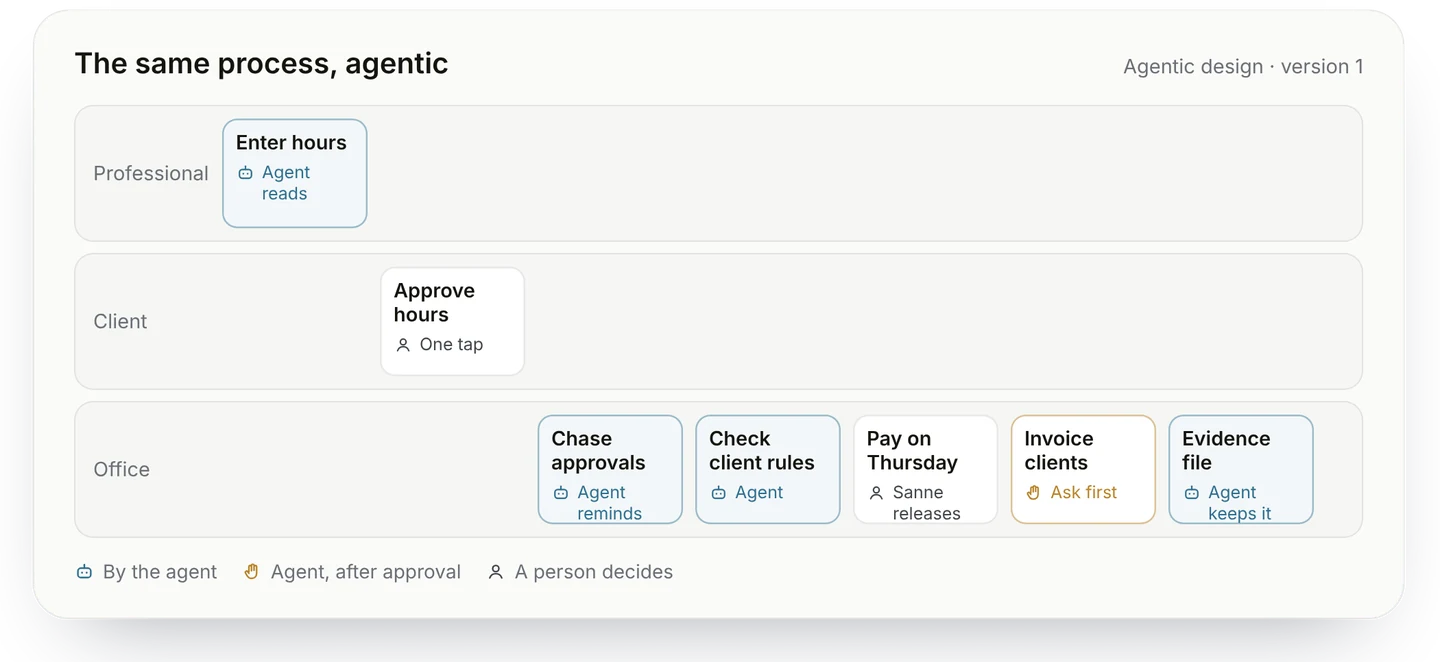
Most steps in this process are reading, checking and chasing. Those are the steps an agent can take on today.
Read every timesheet. An agent reads hours from the professionals’ app, from a scanned paper form or from an email.
Get the approval. It asks the team lead to approve in their own channel, and reminds them before payroll closes.
Check against the client’s rules. It checks each timesheet against that client’s rates, irregular-hours pay and break rules, and flags what deviates.
Prepare payroll and invoices. It prepares the payroll batch, the client invoices and the self-billing invoices, and keeps the evidence file complete.
People keep the decisions. A correction above a set amount, releasing payroll, sending invoices and any dispute with a client stay with the team.
What others have achieved
Few staffing firms publish measured results on this part of their work yet. The clearest numbers we found point the same way: the work is large, errors are common, and automating it pays.
−68%
Hours spent on 4,000 timecards a week at AMN Healthcare, a US healthcare staffing firm, after it automated the work
1 in 5
Payrolls contain errors, at $291 per error on average. Time records cause the most
10%
Staffing firms that run agentic AI across their whole workflow in 2026
The AMN result came from rule-based automation, before today’s agents. Agents can also handle the cases rules cannot: a scanned form, an unclear email, a client with its own terms. And most staffing firms have not yet applied agents to this work.
Start from the process you have
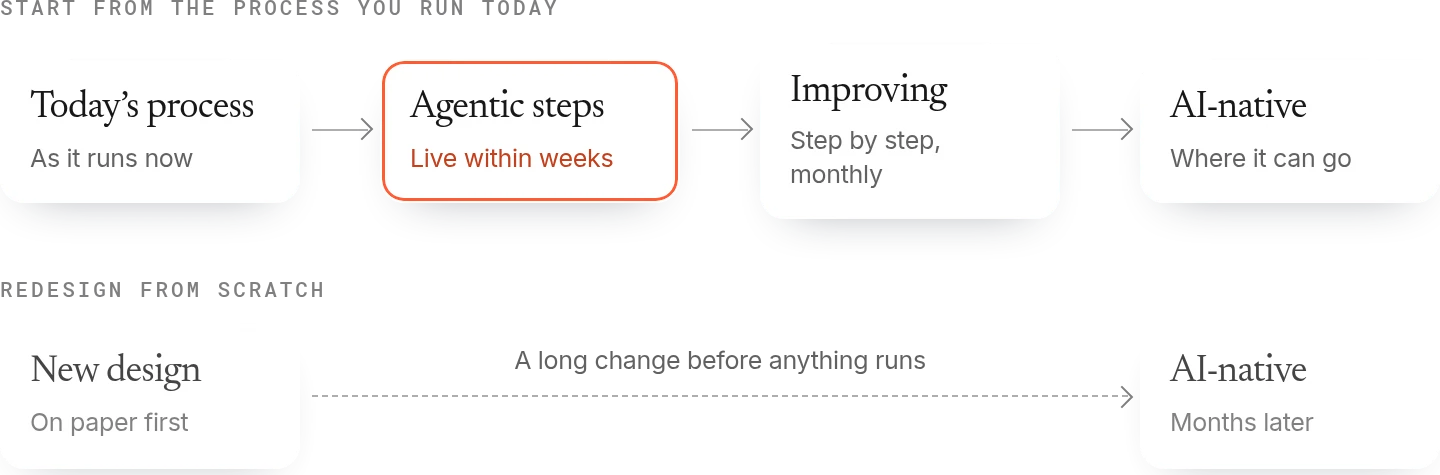
If you designed this process from scratch with AI, it would look different. Steps would merge, and there would be less waiting.
Getting there in one move means a long change before anything runs. We start from the process your team runs today, and make each step agentic where an agent can do it well.
You see the benefit within weeks. The people in the process keep working the way they know, with less routine work on their desk. From there, the process improves step by step.
How it works
You explain how the process works today and what success looks like for you, in a conversation with Aito, the assistant in the Aitonomy app. From there, two designs are made, one after the other.
The process design. A complete picture of the process as it runs today: every participant, every step, the tools, the rules and the way of working. It is drawn just by asking you and your team questions.
The agentic design. Aitonomy makes the process agentic automatically, on top of the process design. Before it runs, it is proven by simulation and test runs. It then runs within clear guardrails, with approvals at first, and Aitonomy keeps watching it.
Your team is needed mostly at the start, to explain the work, the people involved and the tools they use. After that, the team approves the design and the moment it goes live.
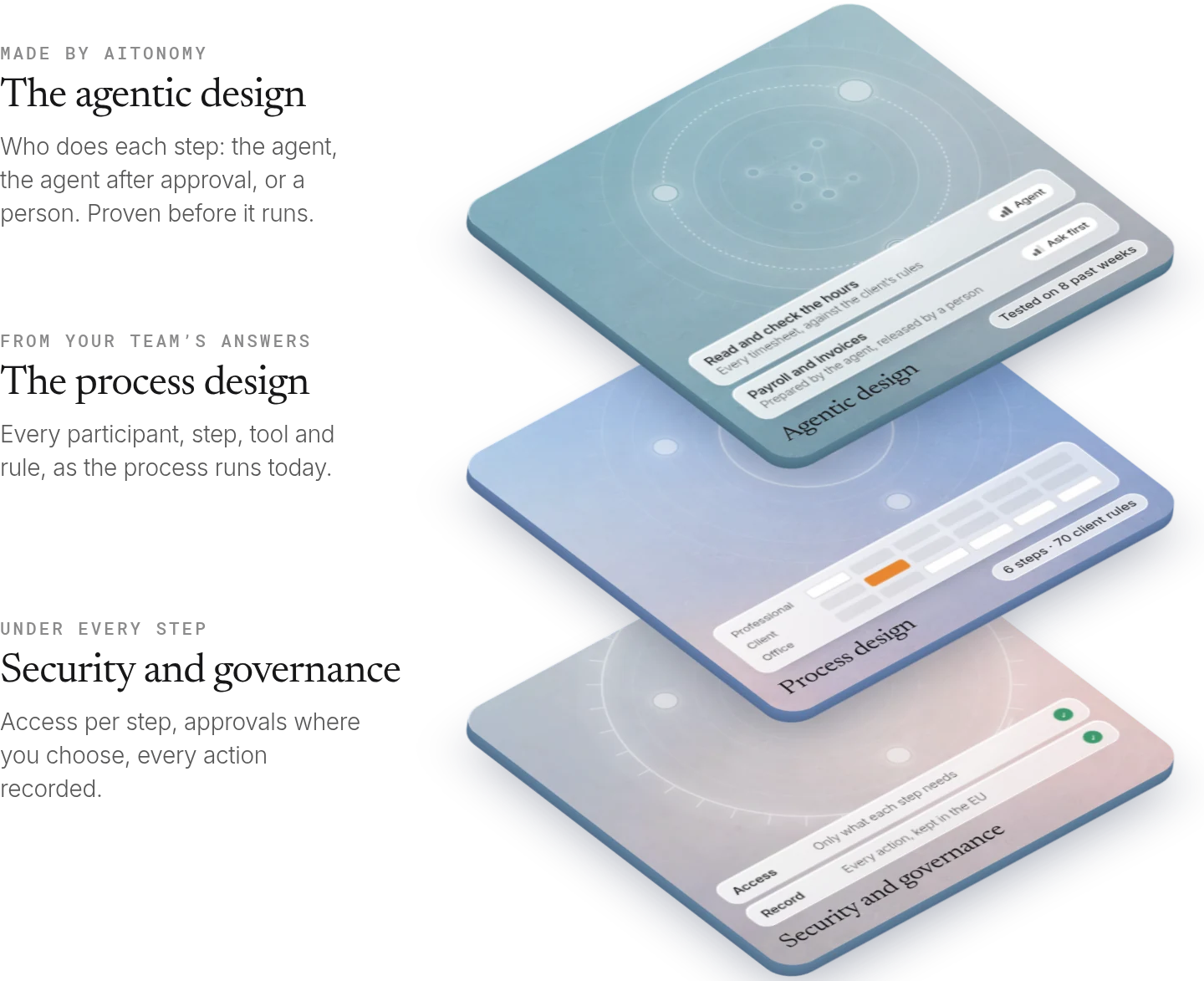
The process design: understand the process
Context · Strategy · How Context works →
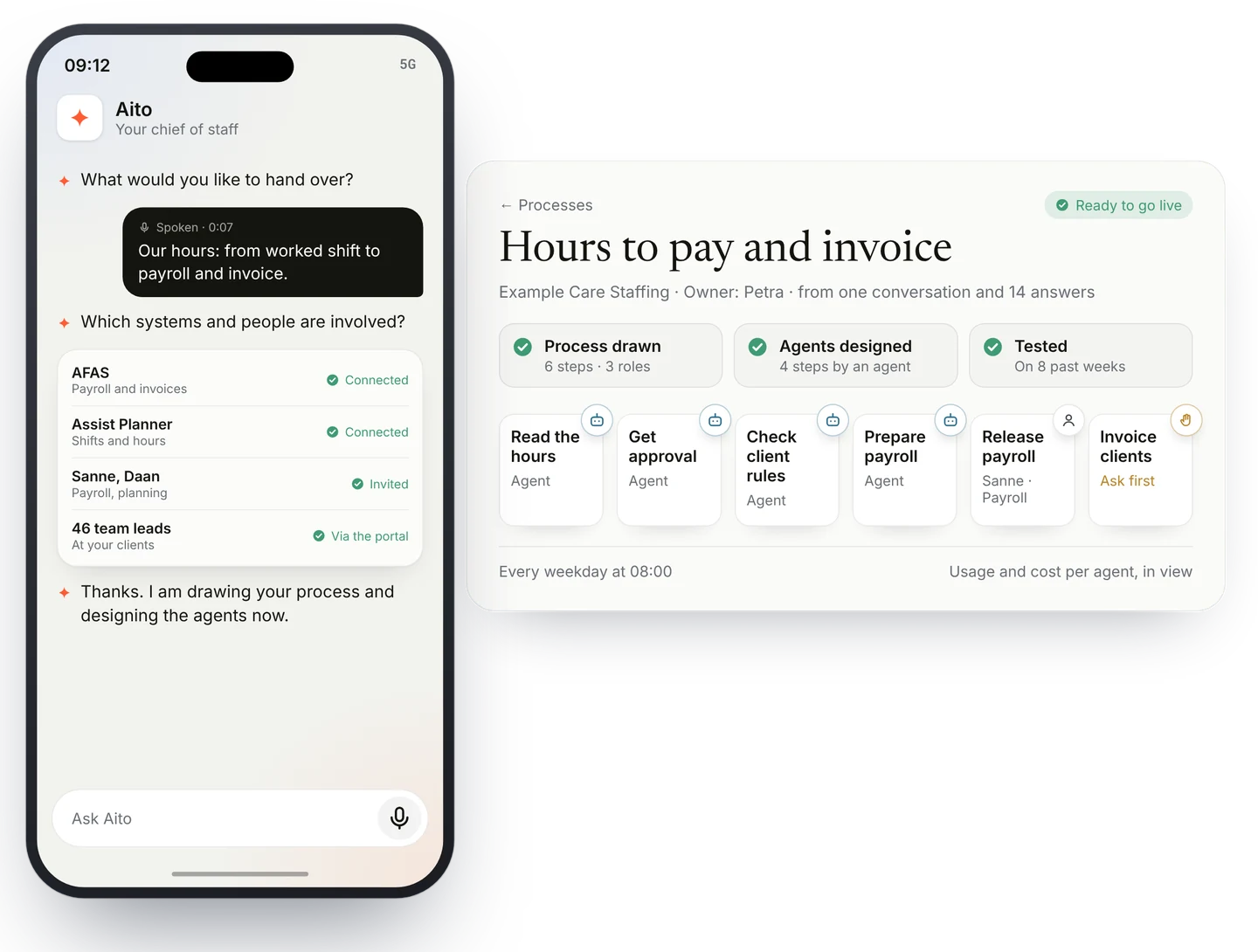
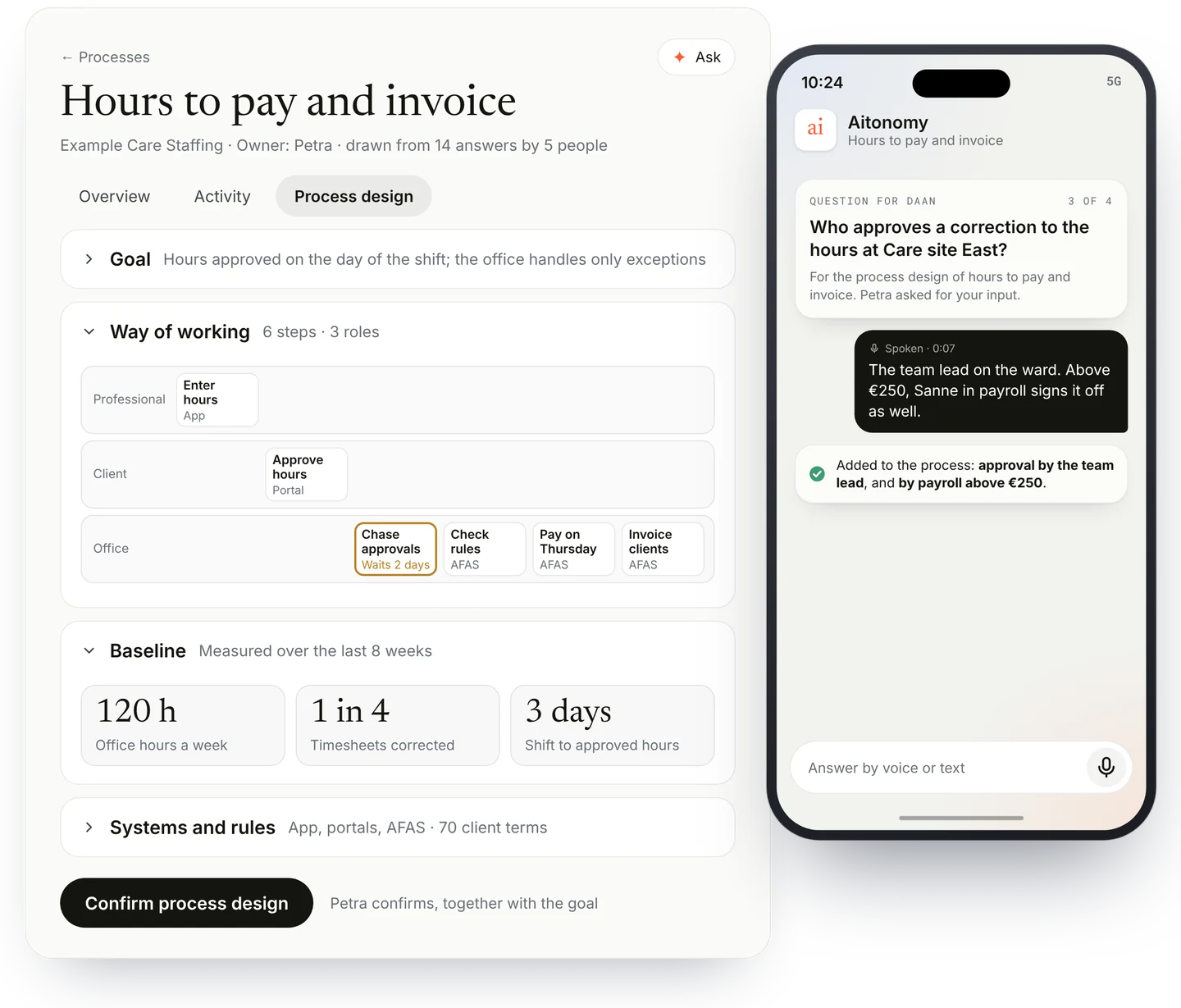
It starts with the process as it runs today, and with your goal. The firm’s operations director explains the problem to Aito in a few sentences, by voice on her phone: approvals arrive too late, the office loses Wednesday to chasing them, and payroll on Thursday is under pressure. Success, for her, is approved hours on the day of the shift and an office that only handles the exceptions.
Aito then asks the right questions until the picture is complete, and passes questions on to the people who know the answer. Who takes part in the process, inside the firm and at the clients? Which tools are used at each step? Which rules apply, and how does the team actually work, including the exceptions? Where does the work wait?
The questions go to the people who do the work, in Teams, by mail or in the Aitonomy app, where they can simply answer by voice. Aitonomy also reads what the systems already show. Nobody has to write a process description or fill in a template.
From the answers, Aitonomy draws the process: every participant, every step, the tools, the rules and the way of working, with the hours and days each step takes today. That picture is the process design. The process owner checks it and confirms it, together with the goal and the business case.
The agentic design: make it agentic
Agents, Security and governance · Delivery · How agents work →
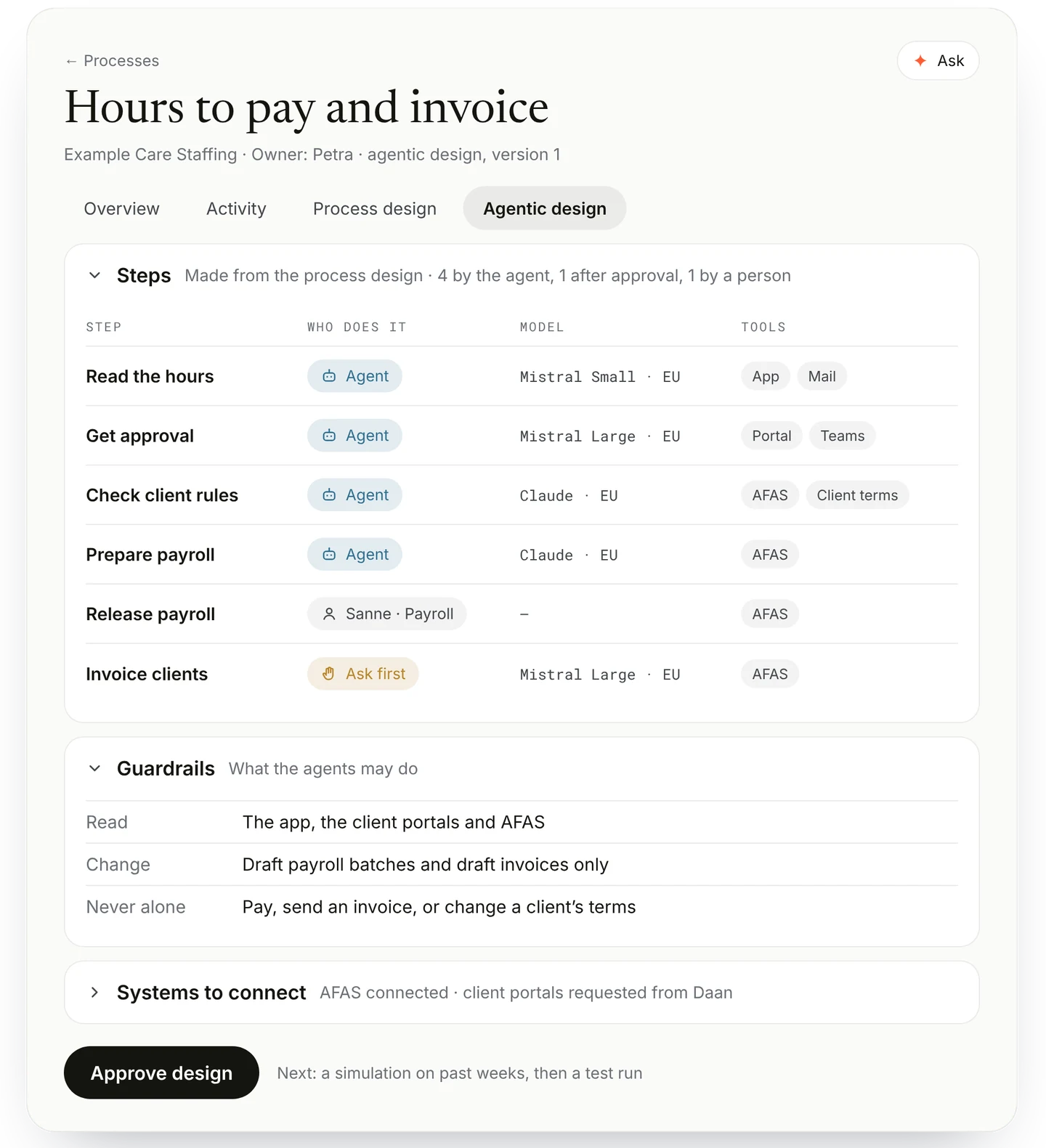
With the process design confirmed, Aitonomy makes it agentic, automatically. It lays an agentic design on top of the process as it runs today, aimed at the goal.
For every step it sets who does the work: the agent on its own, the agent after a person approves, or a person. At Example Care Staffing, reading and checking timesheets is done by the agent. Payroll and invoices wait for a person to release them.
It chooses a suitable model for each step, hosted in the EU, and sets the guardrails: which systems each agent may read and change, and what it may never do without a person. It lists the systems to connect, such as the payroll system and the accounting package, and asks the right person to connect them.
The process owner reviews the agentic design and approves it. Nobody at the firm has to design anything.
Prove it, then run it
Agents · Delivery · How agents work →
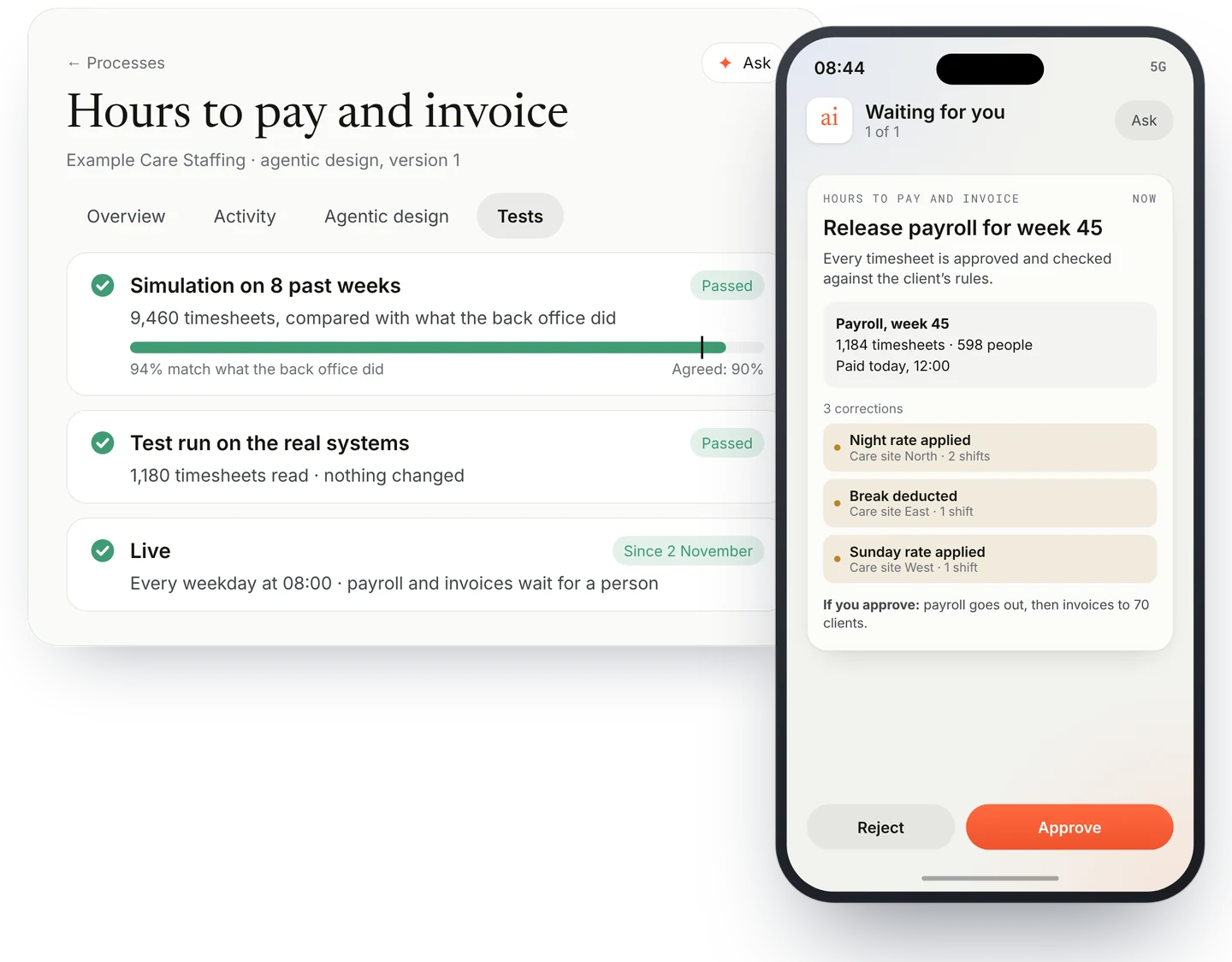
Before anything runs for real, the agentic design has to prove it does what it should. Aitonomy simulates it on the firm’s own past weeks and compares the agent’s results with what the back office actually did.
Then it does test runs on the real systems. It reads everything it would read and shows what it would do, without changing anything.
When the results meet the agreed quality, the process owner confirms and it goes live, within the guardrails set in the design. At first, the steps that change something run with an approval: a person sees what the agent proposes and approves it with one tap.
It runs on a schedule, every weekday at 08:00. The team approves in the channels they already use: Teams, mail or the firm’s own Aitonomy app on their phone. Aitonomy trains each role on the screens that role will use.
Monitor quality, compliance and cost
Intelligence, Security and governance · Adoption · How Intelligence works →
Once the process runs, Aitonomy keeps watching it. Quality is checked against the criteria agreed at the start, and the owner gets an alert when results drift.
Every action and every approval is recorded. Each agent reaches only the systems its steps need, and the evidence is ready for an auditor or an inspection.
Usage, cost and time saved are visible for the process, including what the agents used in AI models. Anyone with access can ask, for example “what did the hours process cost last month, and what did it save?”, and get an answer with its sources.
The process keeps improving. Where the agent has proven itself, the owner can stop approving a step; the approval comes back as soon as the process changes. When a correction keeps coming back, the owner asks for a change, and Aitonomy designs and tests the new version before it runs. Every version is kept, and the earlier one can be restored.
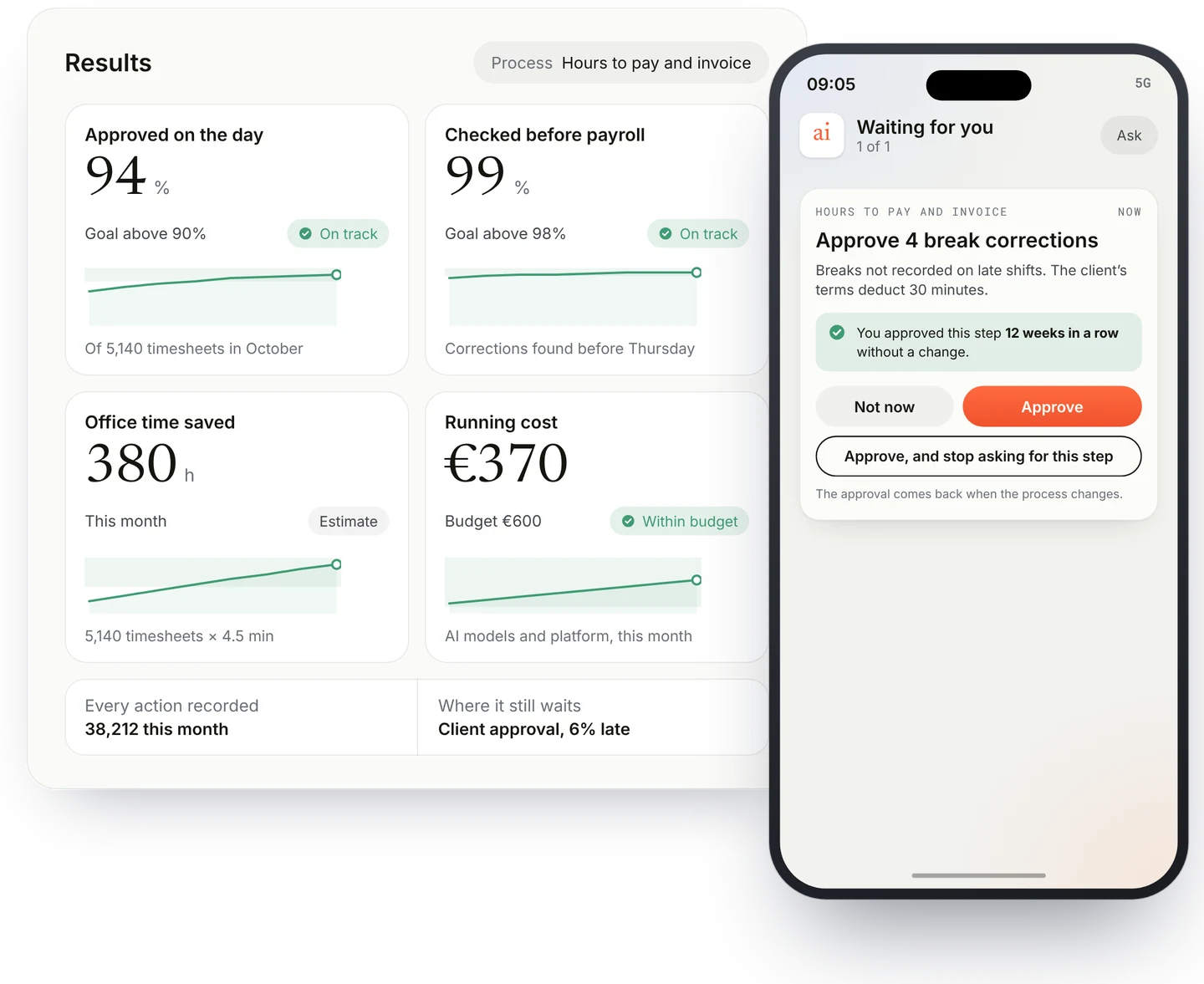
The result
| Before | After (example) | |
|---|---|---|
| Shift to approved hours | About 3 days | Same day for most shifts |
| Office time per timesheet | About 6 minutes | About 1.5 minutes |
| Office hours on timesheets each week | About 120 | About 30 |
| Timesheets that need a person | All | About 1 in 10 |
| Corrections found after payroll | Every week | Rare, checked before Thursday |
How we calculate it. 1,200 timesheets a week × 4.5 minutes saved is about 90 office hours a week. At €45 an hour that is about €4,000 a week, or about €200,000 a year, before the cost of the platform. Invoices also go out earlier, which shortens the gap between paying weekly wages and being paid by clients.
Put in your own numbers, and the conversation is about one process and one business case. How to build the business case →
Within your rules
Security and governance · How Security and governance works →
Data. Hosted in the EU and never used to train a model.
Access. Each agent reaches only what its task needs, with rights taken from your own systems.
Approval. At the steps you choose. Payroll and invoices are released by your own people.
Record. Every action and approval is kept, ready for your auditor, the NEN 4400 inspection and the Wtta. How we handle security →
Where it can go next
Once the process runs agentically, it can move further towards an AI-native process. Steps merge, waiting time disappears, and approvals stay only where they matter.
The same context and the same team are ready for the next process.
| Process | What the agent does |
|---|---|
| Equal-value pay per client | Collects each client’s terms, applies them and keeps the evidence |
| Shift requests and sick calls | Finds a replacement before the planner’s phone rings |
| Papers that expire | Watches ID, BIG registration, diplomas and certificates of conduct, and keeps the file ready for inspection |
| End dates and extensions | Flags assignments before they run out |
Start with one process. In a 30-minute use case session we map your hours-to-invoice process with you. You get a one-page process map, whether we continue or not. Book a use case session →
Start from the process you run today, and let it improve from there.
Sources
- Genus Technologies, Quick wins with robotic process automation, the AMN Healthcare timecard case (vendor case study, undated)
- EY for Paycom, Payroll errors average $291 each (2022), a survey of 508 US payroll professionals
- Bullhorn, GRID 2026 industry trends (February 2026), a survey of about 2,300 staffing professionals
- KvK, Wtta: stricter rules for staffing agencies and other lenders
- Flexhub, Equal or equal-value pay in the staffing collective agreement 2026
- Job adverts for back-office, planning and payroll roles at Dutch healthcare staffing firms, October 2026, on the weekly hours, approval and payroll work